
The BYOM template file has five sheets that need to be populated for customized model ingestion into Axio360.
- Model
- Practice Level
- Model Info
- Model Scoring
- Model Terms
Model - First Sheet
The data entered in row 2 on the Model sheet specifies the model name and version via sheet columnsModel Sheet Columns:
Tables can't be imported directly. Please insert an image of your table which can be found here.
TitleFigure 1: Showing the Model sheet using CRI v1.2 Tier 1 (CMMI) example title and version data.

Practice Level - Second Sheet
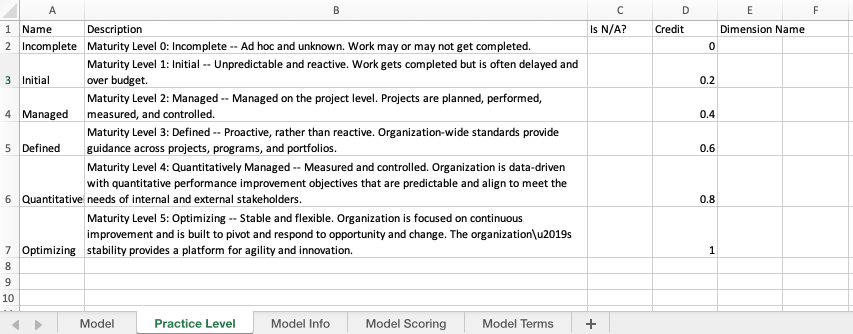
The data entered on the Practice Level sheet requires more details:
- Name
- Description
- Value
- Credit
- Dimension Name
Figure 2: Showing the Practice Level sheet using CIS example data, including defined dimensions.

Figure 3: Showing the Practice Level sheet using CRI v1.2 Tier 1 (CMMI) example data.
Tables can't be imported directly. Please insert an image of your table which can be found here.
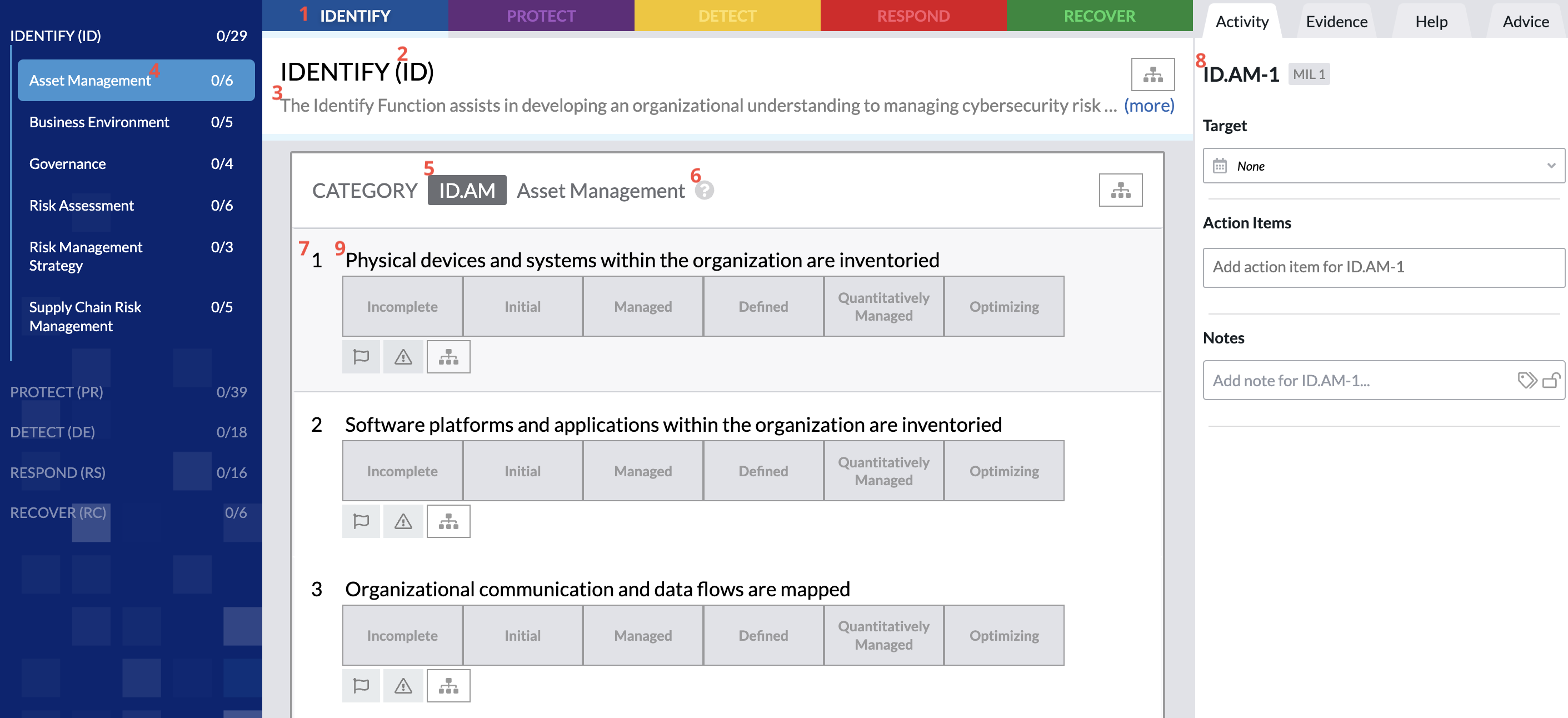
numberFigure 4 shows how a defined practice level might look in Axio360 and how the practice level values map, as indicated by the red numbers (this value mapping is not visible in the UI):

Figure 5 shows how dimensions are visualized in Axio360, as indicated by the red boxes:

Model Info - Third Sheet
The Model Info sheet contains the building blocks of the model that determine the visual representation of the assessment in Axio360. The template supports one or two levels of organizational depths before the user question and response action workflow. The Model Info sheet columns are as follows:
- Domain Name
- Domain FQN
- Domain Description
- Objective Name
- Objective FQN
- Objective Description
- Practice Name
- Practice FQN
- Practice Text
- Practice Dimension
- Practice Weight
Figure 6: Showing the Model Info sheet using CRI v1.2 Tier 1 (CMMI) example data.

Objectives are an optional level of model hierarchy. If your model does not have objectives leave the Objective Name, FQN, and Description columns blank for ALL rows. Mixing Domains with objectives and without is not currently supported. Models that utilize numeric values for the Domain Name column only and do not utilize objectives have limited informative elements in the model’s left-navigation TOC or above the practices fields. Although certain columns are optional on the template, if not used, areas on the assessment view will be empty or repeat information provided on a higher-level column in the template. As a best practice recommendation, use short, descriptive title-like strings for “Name” columns and utilize the “Description” columns to provide details.
Tables can't be imported directly. Please insert an image of your table which can be found here.
NIST CSF1Domain Name234Objective NameDomain FQNObjective NameObjective Name56UsuallyPractice7Objective FQNPractice Name8NamePractice Level9Figure 7 shows the reference numbers for the different column visualizations in the Axio360 UI:
Model Scoring
The Model Scoring sheet defines how the model is scored and how that score is displayed in Axio360. The Model Scoring Sheet Columns are:
- Aggregation Method
- Decimal Places
- Bottom of Scale
- Top of Scale
- Use Scaling
Figure 8: Showing the Model Scoring sheet using CIS 18 example data.

Tables can't be imported directly. Please insert an image of your table which can be found here.
Model Terms
The Model Terms sheet defines the terms a model displays to users. Internally, the terms used are Domain > Objective > Practice > Dimension, but these can be set to whatever is needed for any given model.
Figure 9: Showing the Model Terms sheet using CIS 18 example data.

Figure 10: Showing the Model Terms sheet using CRI v1.2 Tier 1 (CMMI) example data.

Tables can't be imported directly. Please insert an image of your table which can be found here.